Showing posts with label transcriptions. Show all posts

09 September 2011

Transcribing for Posterity

Recently BillionGraves crossed the 200,000-record mark, and the number it still climbing. In light of all these available records, I thought I’d revisit some points on how to give the best you can while you’re transcribing.

The most important part about transcribing is remembering that you’re trying to make sure as much information as possible gets into the searchable fields. Our search engine can’t search images; it can only search words. The more information you get into typed-up words, the more information the search engine can sort through to help people find their families.

With that in mind, most of these points will be apparent.
  • Transcribe every part of the name and as much of a date as you can. This is going to be one of the most important things you can do because names and dates are the first way researchers will try to locate someone.
  • Transcribe the ages of the deceased individual (if it is written on the stone). Some headstones or grave markers provide only one date: either the birth date or the death date. However, many of these stones will say how old the individual was in years, and possibly even months and days as well. This information is as important as a date. It will help researchers narrow their search in other records besides the headstone.
  • Transcribe the epitaph if you can at all read it (and if there is one on the stone).* It is less likely that a descendant will be using the epitaph to search for someone. However, because epitaphs are typically complete phrases, they are sometimes easier to remember than names and dates. Someone searching for a stone they once visited might be able to remember the epitaph and not the name.
  • Transcribe any other information you can get off the stone. Any of the stone’s information could be helpful in finding an individual’s grave and in recording it for posterity. If you can read it, please put it in your transcription, even if you aren’t sure what it means.
  • Transcribe headstones in their native language. If you would like to provide a translation into your own language, you may do so in the Description field. However, the transcription information should include the headstone information as it appears on the stone. That is the primary goal of the transcription. Anything else is gravy. If you cannot transcribe the stone in its native tongue, skip it.
If you’re following those principles, other aspects of transcribing don’t matter as much. Some of you transcribe in all caps (which used to be standard in genealogy transcriptions because it saves the difficulty of figuring out what to capitalize). This is just fine, because your transcription will show up in the search just the same, and the important thing is to direct searchers to the photo. If you capitalize normally, even if the headstone is carved in all caps, that is also just fine—the transcription will show up in a search normally. The important part is to turn the headstone’s text into something the BillionGraves search engine can understand.

Thank you for all your hard work, and for pushing the records we can share above 200,000!
______________________________
*Currently the BillionGraves search engine cannot search the epitaph or description fields of a transcription, but it is something we will add eventually.

02 September 2011

Deciphering Welsh Writing

Transcribers may have noticed the recent influx of Welsh headstones. When BillionGraves first started to get a lot of photos from Sweden, one of our users provided information to help us transcribe Swedish stones. Luckily one of the individuals uploading photos from Wales has supplied a similar primer that explains phrases and words that commonly appear on Welsh headstones. Below are list of months, weekdays, family relations, feminine and masculine possessive forms, plural possessive forms, notes of affection (usually found in the epitaph), preliminary statements (also common in epitaphs), and  other key words and phrases.

You’ll notice that some words appear in more than one form. For example, son appears as both mab and fab. This is because in Welsh, certain letters undergo a sound mutation when combined with other sounds. Thus mab means son when the word stands alone, but in a phrase like her beloved son it appears as fab (ei hannwyl fab) because the M sound mutates to an F (which, in Welsh, sounds like the English V—are you confused yet?).

(Note: Even though this post will give you translations for some Welsh words, please transcribe the stone in the original language; you can add the English translation in the description box if you so choose. Most of these are listed to help you determine which words on the stone are names and how to determine the birth and death dates.)

Months of the Year
Welsh: English
Ionawr: January
Chwefror: February
Mawrth: March
Ebrill: April
Mai: May
Mehefin: June
Gorffennaf/Gorphenaf: July
Awst: August
Medi: September
Hydref: October
Tachwedd: November
Rhagfyr: December

Days of the Week
Dydd Llun: Monday
Dydd Mawrth: Tuesday
Dydd Mercher: Wednesday
Dydd Iau: Thursday
Dydd Gwener: Friday
Dydd Sadwrn: Saturday
Dydd Sul: Sunday

Family Relations
Baban: Baby
Brawd: Brother
Cefnder: Cousin (Male)
Chwaer: Sister
Cyfnither: Cousin (Female)
Gwraig: Wife
Gwr: Husband
Mab: Son
Mam: Mother
Mam-gu: Grandmother
Merch: Daughter
Nai: Nephew
Nain: Grandmother
Nith: Niece
Plant: Children
Plentyn: Child
Priod: Spouse
Tad: Father
Tad-cu: Grandfather
Taid: Grandfather
Wyr: Grandson
Wyres: Granddaughter

Feminine Possessive Forms
Ei gwr: Her husband
Ei mab: Her son
Ei merch: Her daughter
Ei mherch: Her daughter
Ei phlentyn: Her spouse
Ei phriod: Her spouse
Ei hannwyl blentyn: Her beloved child
Ei hannwyl briod: Her beloved spouse
Ei hannwyl fab: Her beloved son
Ei hannwyl ferch: Her beloved daughter
Ei hannwyl wr: Her beloved husband

Masculine Possessive Forms
Ei blentyn - His child
Ei briod - His Spouse
Ei fab - His son
Ei ferch - His daughter
Ei Wraig - His wife
Ei annwyl blentyn - His beloved child
Ei annwyl briod - His beloved spouse
Ei annwyl fab - His beloved Son
Ei annwyl ferch - His beloved daughter
Ei annwyl wraig - His beloved wife

Plural Possessive Forms
Eu mab: Their son
Eu baban: Their baby
Eu merch: Their daughter
Eu plenty: Their child
Eu hannwyl blentyn: Their beloved child
Eu hannwyl fab: Their beloved son
Eu hannwyl faban: Their beloved baby
Eu hannwyl ferch: Their beloved daughter

Notes of Affection
Anwyl Blant: the beloved children
Annwyl blentyn: the beloved child
Annwyl briod: the beloved spouse
Annwyl dad: the beloved father
Annwyl fab: the beloved son
Annwyl faban: the beloved baby
Annwyl fam: the beloved mother
Annwyl ferch: the beloved daughter
Annwyl wr: the beloved husband
Annwyl wraig: the beloved wife

Preliminary Statements
Bedd: Grave
Er cof am: In memory of
Er cof tyner am: In tender memory of
Er serchog gof am: In loving memory of
Er serchus gof am: In loving memory of
Gorweddle: The resting place
I gofio’n dyner am: In tender memory of
O dan y garreg hon: Underneath this stone
Yma y claddwyd: Here was buried
Yma y gorwedd: Here lieth

Other Key Words and Phrases for Headstones
Blwyddyn: Year
Corff/Corph: Body
Diwrnod: Day
Dydd: Day
Ganwyd: Born
Gynt o: Formally of
Hefyd: Also
Hunodd yn yr Iesu: Fell asleep in Jesus
Isod: Underneath/Below
Mis: Month
Oed: Age
O’r plwyf hwn: Of this parish
Y dywededig uchod: The above named (Male)
Y Ddywededig uchod: The above named (Female)
Yn 7 mlwydd oed: 7 years old
Yr hwn a fu farw: Who died (Male)
Yr Hon a fu farw: Who died (Female)
Uchod: Above

If you’re looking up Welsh words in a dictionary, remember that CH, FF, LL, RH, TH, and DD are all distinct alphabet letters with their own sounds, so words that start with CH will be found in the CH section of a dictionary, not the C section, etc.

If you think transcribers could use some tips for transcribing headstones from your area, send some notes to me at kristy.stewart @ billiongraves.com and I’ll share them here for everyone to use.

11 August 2011

Top-Notch Transcribers

Yesterday was a landmark day for the transcribers: there were more records transcribed yesterday than ever before (and the gap between yesterday and every other day was sizeable). Those transcriptions put us over a major milestone: 100,000 records. Each of those records belongs to someone’s family member, and now they’re easy to find for anyone who’s looking for them.

We’ve had some more photo collectors cross the 1,000-photo finish line as well: tjalbrecht, Hokie374, GeneologyMaster, ValeriC84, and PapaMoose (though PapaMoose assures me that his nephew was actually taking many of the photos while he was clearing off the stones, so he’s going to give his t-shirt to Helpful Nephew). These collectors have been a part of a huge spike in photo uploads.

Those photos have been uploaded from all over, and here’s a sample of the areas we’ve gotten photos from in the past two days, divided by continent.

North America
  • Alabama, USA 
  • California, USA 
  • Idaho, USA 
  • Louisiana, USA 
  • Michigan, USA 
  • New York, USA 
  • Ohio, USA 
  • Ontario, Canada 
  • Pennsylvania, USA 
  • South Carolina, USA 
  • Texas, USA 
  • West Virginia, USA 
Europe 
  • Wales, UK 
  • Stockholm, Sweden
Australia 
  • Canterbury, New Zealand
Many of these areas have even had more than one of their cemeteries updated in the past two days, so we’ve had a lot of additions. Thanks, everyone!

08 July 2011

Deciphering Swedish Stones

You may have noticed that there are a lot of headstone photos being collected in Sweden. If you don’t understand Swedish, these photos may be too baffling to transcribe—and if you’re like me, you don’t like having to skip a photo just because of something as silly as a language barrier.

Thankfully, one of our Swedish users has sent in a few tips to help non-Swedish speakers so we can skip fewer headstones and learn something new about Sweden’s graves.

There are a few acronyms to be aware of:
Here, här vilar is written out.

  • H.v.: This stands for här vilar, which in means here rests.
  • F.: This stands for född, which means born. It’s equivalent to née in English. In English, to indicate a maiden name (the name someone is born under), you would write someone’s current first and last name, then née and the maiden name (ex. Laura Jameson née Smith would be a woman who, when she was born, was named Laura Smith). In Sweden, född is used the same way, with född in place of née (Laura Jameson f. Smith). (Trivia for English speakers who didn’t already know, née is French for born, so its use in English is identical to the Swedish word: född and née are the same idea, just communicated with different sounds.)
Axel was a medical officer; Frida’s maiden
name is Nordin.
In the comments on an earlier post, Transcribing Tips & Tricks, a Danish-speaking user also gave a few pointers on Swedish words (Danish and Swedish have several linguistic similarities).
  • Hustrun (and variations) means wife.
  • Makan (and variations) means companion or spouse.
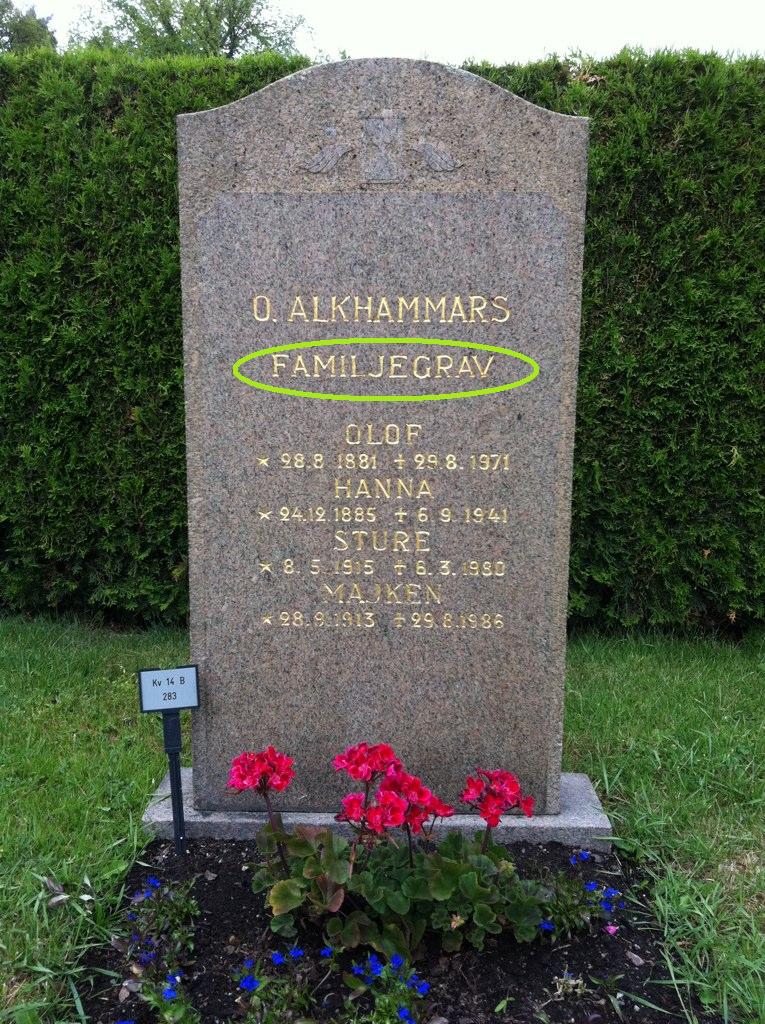
  • Familjegrav indicates that the headstone actually marks a family plot, not one particular head (it sounds a lot like family grave if you say it right). These family plots are very common in the photos that have been collected.
  • A big long word in front of a man’s name probably indicates his profession. (This is why I like to keep Google Translate open when I’m doing transcriptions in languages I don’t know. It increases my chances of not skipping a photo.)

This familjegrav lists individuals;
some don’t.
If you have any other tips about Swedish graves, post them in the comments below. If you have tips about your local graves’ quirks, please email them to kristy.stewart (at) billiongraves.com and I’ll put together a post about your area. It’ll help everyone learn something new, and it will get the photos transcribed and searchable more quickly (and more accurately). Do graves in your country (or local area) tend to be grouped into family plots, like the Swedish familjegrav? Is there a tradition of using family mausoleums? Unique ways of formatting names? We’d be happy to have whatever tips or tidbits of information you’d like to share with us.

_________________________
All photo examples are taken from Norra begravningsplatsen in Sweden.

29 June 2011

Transcribing Tips & Tricks

Transcribing photos on BillionGraves is a fairly simple process. You put as much information as possible into the appropriate fields (Given Names, Family Names, etc.), and you then put anything that doesn’t fit into the free-text boxes that appear after you click “Add Description.” There are instructions on how to handle special cases on our transcription help page. Overall, it isn’t tricky. But there are a few things you can do that will make transcribing even easier.

Foreign Grave Markers

First, if you don’t know the language of the headstone and aren’t familiar with the way it is laid out, pull up Google Translate or some other quick reference. While transcribing Swedish headstones, I discovered that “hustrun” is not an extremely common given name, but rather a title meaning “wife” (it may also be in the possessive case, Google isn’t clear on that, but it clarifies that it is not a given name, and that’s what I as a transcriber need to know). There are still many headstones that aren’t in my native English that puzzle me—which is why I take advantage of the “skip image” function. If it’s a headstone from a country foreign to me, I know that there is at least one person registered with BillionGraves who understands the area, because he or she uploaded the photo in the first place. As more people participate in the BillionGraves project, the number of people who understand diverse grave marker types and languages will grow, and they can help with markers that may not be familiar to you. (You’re helping others right now, by transcribing the photos that make sense to you.)

Transcribing Shortcuts

Once you’ve made sure you can understand all necessary information on the stone, there’s nothing to stop you from quickly filling out the form and moving on to the next photo. But if you happen to dislike using your mouse, we’ve set up a several keyboard shortcuts for you to make the process faster for the mouse-averse. We mentioned two of them before, but we’ve added many more since then. This is a complete list of our current shortcuts:
  • Add an Individual: CTRL + I 
  • Open the Description Box: CTRL + D 
  • Rotate the Image: CTRL + R (rotates the image 90 degrees clockwise) 
  • Zoom In on Image: CTRL + + 
  • Zoom Out from Image: CTRL + - 
  • Scroll Image Up: CTRL + Up arrow 
  • Scroll Image Down: CTRL + Down arrow 
  • Scroll Image Right: CTRL + Right arrow 
  • Scroll Image Left: CTRL + Left arrow 
  • Save the Transcription: CTRL + S 
  • Go to Next Image: CTRL + M

Reporting Photos

When a photo is impossible to transcribe, either because the photo is bad, the stone is too worn, there’s nothing to transcribe, or it’s in a language that isn’t supported yet, remember that you can report the image by clicking the red button beneath it (sorry, no shortcut for this). You can then select the reason you’re reporting the image and it will be sorted so we can take a look and decide what the best solution is for each photo.

If you have any tips for your fellow transcribers, please post them in the comments.

    27 June 2011

    Top the Leaderboard: Track Your Stats

    The Android app isn’t the only thing we’ve been building over the past few weeks: we’re also improving the way we track photos, records, and cemeteries. A lot of what we’ve done keeps the database running smoother and you’ll never have to see it. But one fun part about our tracking everything is we can now acknowledge those of you who have participated above and beyond expectations. Yesterday we launched the BillionGraves Leaderboard (you’ll need to be logged in to see it; there’s also a link to it from your dashboard).

    Click on the photo to enlarge the board for June’s leading transcribers and photo collectors (as of 10:10 AM MDT). A special congratulations to Catirrel and trishkovach, who each are currently topping either the photo or the transcription list. And an extra thank you to crex and Hokie374, who both are into the Top 10 for both categories.

    The Leaderboard results can be viewed according to the current month or all time, and they update constantly. It’s not much, but it’s our small way of recognizing everyone who is working so hard to contribute to the BillionGraves project.

    In addition to the Leaderboard, we’ve made several subtler improvements to existing aspects of the site. 

    Report Images

    For transcribers, there’s now a much improved Report Image function. If you click the red button beneath a problem photo, you’re given several options as to the reason why you’re reporting the photo (this helps us know what to do with it):
    • This photo is blurry or unreadable: For poorly taken photos that need to be redone.
    • The headstone is unreadable: For headstones that are too hard to decipher.
    • This isnt a headstone!: Just in case something that isn’t a grave monument gets past our image checker.
    • Theres no information to transcribe: For monuments or photos that don’t contain anything you can transcribe.
    • Non-Latin characters (Arabic, Chinese, etc.): For monuments with non-Latin letters. In the future these will be supported, so we want to keep these stones separate for future transcribing.
    • Other: Because we can’t think of everything.
    Before you mark a photo or stone as unreadable, please make sure it actually is. There are many photos and stones that may be less than ideal, but are still legible with a bit of zooming, squinting, and informed thinking.

    Shortcut Keys

    In case you aren’t already aware, I want to let you know about our shortcut keys for transcriptions. CTRL+S will save your transcription and CTRL+I will add an individual. We plan to add even more of these so transcriptions can be as quick and easy as possible.

    Add an Individual to a Saved Transcription

    There have been a few instances in which a transcription was saved before all the individuals in the photo were recorded. Unfortunately there was no way to add an individual after saving. That has been remedied, so you can now add individuals regardless of where you are in the transcription process.

    Basic Error Checking

    We’ve introduced some basic error checking (someone’s birth or death date cannot be recorded as tomorrow, for example). We intend to make these more sophisticated as we go along so we can improve the quality and accuracy of BillionGraves transcriptions.

    Thank you to everyone who has already downloaded the Android app this weekend and started using it. You’ve given the swift-fingered transcribers a lot more to do.