Showing posts with label tips. Show all posts

02 September 2011

Deciphering Welsh Writing

Transcribers may have noticed the recent influx of Welsh headstones. When BillionGraves first started to get a lot of photos from Sweden, one of our users provided information to help us transcribe Swedish stones. Luckily one of the individuals uploading photos from Wales has supplied a similar primer that explains phrases and words that commonly appear on Welsh headstones. Below are list of months, weekdays, family relations, feminine and masculine possessive forms, plural possessive forms, notes of affection (usually found in the epitaph), preliminary statements (also common in epitaphs), and  other key words and phrases.

You’ll notice that some words appear in more than one form. For example, son appears as both mab and fab. This is because in Welsh, certain letters undergo a sound mutation when combined with other sounds. Thus mab means son when the word stands alone, but in a phrase like her beloved son it appears as fab (ei hannwyl fab) because the M sound mutates to an F (which, in Welsh, sounds like the English V—are you confused yet?).

(Note: Even though this post will give you translations for some Welsh words, please transcribe the stone in the original language; you can add the English translation in the description box if you so choose. Most of these are listed to help you determine which words on the stone are names and how to determine the birth and death dates.)

Months of the Year
Welsh: English
Ionawr: January
Chwefror: February
Mawrth: March
Ebrill: April
Mai: May
Mehefin: June
Gorffennaf/Gorphenaf: July
Awst: August
Medi: September
Hydref: October
Tachwedd: November
Rhagfyr: December

Days of the Week
Dydd Llun: Monday
Dydd Mawrth: Tuesday
Dydd Mercher: Wednesday
Dydd Iau: Thursday
Dydd Gwener: Friday
Dydd Sadwrn: Saturday
Dydd Sul: Sunday

Family Relations
Baban: Baby
Brawd: Brother
Cefnder: Cousin (Male)
Chwaer: Sister
Cyfnither: Cousin (Female)
Gwraig: Wife
Gwr: Husband
Mab: Son
Mam: Mother
Mam-gu: Grandmother
Merch: Daughter
Nai: Nephew
Nain: Grandmother
Nith: Niece
Plant: Children
Plentyn: Child
Priod: Spouse
Tad: Father
Tad-cu: Grandfather
Taid: Grandfather
Wyr: Grandson
Wyres: Granddaughter

Feminine Possessive Forms
Ei gwr: Her husband
Ei mab: Her son
Ei merch: Her daughter
Ei mherch: Her daughter
Ei phlentyn: Her spouse
Ei phriod: Her spouse
Ei hannwyl blentyn: Her beloved child
Ei hannwyl briod: Her beloved spouse
Ei hannwyl fab: Her beloved son
Ei hannwyl ferch: Her beloved daughter
Ei hannwyl wr: Her beloved husband

Masculine Possessive Forms
Ei blentyn - His child
Ei briod - His Spouse
Ei fab - His son
Ei ferch - His daughter
Ei Wraig - His wife
Ei annwyl blentyn - His beloved child
Ei annwyl briod - His beloved spouse
Ei annwyl fab - His beloved Son
Ei annwyl ferch - His beloved daughter
Ei annwyl wraig - His beloved wife

Plural Possessive Forms
Eu mab: Their son
Eu baban: Their baby
Eu merch: Their daughter
Eu plenty: Their child
Eu hannwyl blentyn: Their beloved child
Eu hannwyl fab: Their beloved son
Eu hannwyl faban: Their beloved baby
Eu hannwyl ferch: Their beloved daughter

Notes of Affection
Anwyl Blant: the beloved children
Annwyl blentyn: the beloved child
Annwyl briod: the beloved spouse
Annwyl dad: the beloved father
Annwyl fab: the beloved son
Annwyl faban: the beloved baby
Annwyl fam: the beloved mother
Annwyl ferch: the beloved daughter
Annwyl wr: the beloved husband
Annwyl wraig: the beloved wife

Preliminary Statements
Bedd: Grave
Er cof am: In memory of
Er cof tyner am: In tender memory of
Er serchog gof am: In loving memory of
Er serchus gof am: In loving memory of
Gorweddle: The resting place
I gofio’n dyner am: In tender memory of
O dan y garreg hon: Underneath this stone
Yma y claddwyd: Here was buried
Yma y gorwedd: Here lieth

Other Key Words and Phrases for Headstones
Blwyddyn: Year
Corff/Corph: Body
Diwrnod: Day
Dydd: Day
Ganwyd: Born
Gynt o: Formally of
Hefyd: Also
Hunodd yn yr Iesu: Fell asleep in Jesus
Isod: Underneath/Below
Mis: Month
Oed: Age
O’r plwyf hwn: Of this parish
Y dywededig uchod: The above named (Male)
Y Ddywededig uchod: The above named (Female)
Yn 7 mlwydd oed: 7 years old
Yr hwn a fu farw: Who died (Male)
Yr Hon a fu farw: Who died (Female)
Uchod: Above

If you’re looking up Welsh words in a dictionary, remember that CH, FF, LL, RH, TH, and DD are all distinct alphabet letters with their own sounds, so words that start with CH will be found in the CH section of a dictionary, not the C section, etc.

If you think transcribers could use some tips for transcribing headstones from your area, send some notes to me at kristy.stewart @ billiongraves.com and I’ll share them here for everyone to use.

31 August 2011

Linking Photos of the Same Headstone

The recent Android update included numerous bug fixes and one new feature: linking images. This feature is in response to the need we’ve found (and you’ve undoubtedly seen) to link multiple images of the same headstone so anyone looking for the ancestor buried under that stone can get all the information available.

Using this feature is very simple:

  1. Take a picture of one side of the headstone.
  2. Tap the linking icon (the two chain links in the bottom left corner).
  3. Take a picture of the other side of the headstone.
After you take the second picture, the linking will turn off. If you need to link more than two photos, just tap the linking button again after the second picture and so on until you’ve photographed the entire headstone. (You might also use it when you can get most of a headstone’s information in one shot, but because of tree roots or other immovable obstructions you need another photo to get all the information. Another opportunity for linking is when one large stone bears the family name associated with a large group of small stones surrounding it.)

Right now this feature is only available on Android, but the update to the iPhone is on its way. If you have linked photos together, right now that linking will not display on the website. The developers haven’t had a chance to implement a way to view and transcribe linked photos together. However, the website will be able to remember that the images are linked, so once we have that up and running the linking will display. We didn’t want to delay getting this feature out to you, even if it can’t display on the website, because keeping a single stone’s information together is so important.

Linking on the website will continue to evolve and improve, but for now, it’s fully functional on Android devices and you should make use of it when it’s needed. 

On a completely unrelated note: You only have a few more hours to collect your 1,000th photo and earn your t-shirt. Hurry! Get out to the cemetery and map out those stones!

25 July 2011

Meeting Up for Cemetery Mapping

Our cemetery mapping trip celebrating Utah's Pioneer Day was a definite success: American Fork Cemetery is now 2402 images richer. A small group of 15 BillionGraves contributors gathered in the cemetery and in an hour or so had recorded over a third of the grounds. Some people stopped by after a weekend bike ride; others came from the next valley over to help us map the history the cemetery had to offer.

Our awesome mappers (minus some who had to leave early and me,
because I'm taking the photo and I'm not nearly as
awesome as they are).

Finn (a transcriber) sweeps a stone before
I take a photo.
Not everyone who came had a smartphone, but even those who weren't snapping photos made it faster and easier to record American Fork's headstones. One transcriber brought a broom to help clear the headstones to ensure he'd have good photos that were easy to transcribe when he went home. Others were able to hold up blankets or other props to help fabricate good lighting for each headstone.

My mother holds up a blanket so I can get a good photo.
Since we did our mapping in the morning, many of the headstones had ideal light. However, a few of them ended up with partial shadows cast by trees or other less-than-desirable circumstances, so we made our own lighting using some basics that I always keep in my car. (I've recommended multiple times that you avoid casting shadows, but that is mostly to avoid partial shadows, which can toy with your photo's contrast and make it difficult to read. We used a blanket I keep in my car's back seat to cast complete shadows when a headstone was under a tree or something else immovable.)

The props we found most useful were my blanket and our transcriber friend's broom, but I would have liked to have a powerful flashlight. Some light-colored stones didn't have much contrast on the lettering, and a mirror or flashlight could have targeted some light at just the right angle to bring out the words.

One other hiccup we ran into was sprinklers. They turned on partway through our mapping, but a few intrepid photo collectors dodged them to get the last of their photos.

After mapping out our 2400 photos, we indulged in some delicious bagels for breakfast. All in all, a good event. It also helped us celebrate Pioneer Day (a Utah holiday) because we were able to find the graves of some of those we were celebrating. Pioneer Day celebrates those who trekked across America's Great Plains to settle in Utah. Many of these pioneers have commemorative plaques affixed to their headstones. The plaques were created in 1997 for the sesquicentennial celebration of the journey (the migration began in 1847, though it continued for years afterwards), so the plaques say "Faith in Every Footstep, 1847-1997." Finding these pioneer headstones and recording them on BillionGraves was the perfect way to commemorate their journey.

We also discovered something none of us had known about: American Fork's Heritage Pageant, which takes place in the cemetery among those the pageant strives to remember. The pageant participants were setting up for a practice session while we were visiting. You learn the most interesting things in cemeteries!

Those of us at the American Fork Cemetery were hardly the only ones out mapping headstone photos this weekend. I said I'd like to see what the rest of you could collect, and you delivered. There were thousands of uploads this weekend alone.

517 in Mount Pleasant Cemetery (Gravette, Arkansas, USA)
449 in Alpine Cemetery (Alpine, Utah, USA)
155 in Maple Grove (Ovid, Michigan, USA)
99 in Gunnarsnäs (Mellerud, Västra Götland, Sweden)
87 in Putnam Cemetery (Sciota, Michigan, USA)
86 in Rexburg Cemetery (Rexburg, Idaho, USA)
83 in Lilley Grave Cemetery (Garberville) (Garberville, California, USA)
80 in Loudon Park Cemetery (Baltimore, Maryland, USA)
74 in Maclean Lawn Cemetery (Townsend, New South Wales, Australia)
74 in Jane Cemetery (White Rock, Missouri, USA)
58 in Old Saint James Cemetery (Leesburg, Virginia, USA)
57 in Richmond City Cemetery (Richmond, Utah, USA)
26 in Rigby Pioneer Cemetery (Rigby, Idaho, USA)
23 in Hollisterville Cemetery (Salem, Pennsylvania, USA)
21 in Maclean Cemetery (Maclean, New South Wales, Australia)
21 in Mineral Spring Cemetery (Pawtucket, Rhode Island, USA)
12 in Fort Sam Houston National Cemetery (San Antonio, Texas, USA)
11 in Bountiful Memorial Park (Bountiful, Utah, USA)
6 in Farstorp (Hässleholm Municipality, Skåne, Sweden)
6 in Hackett Cemetery (Dearborn, Missouri, USA)
12 in the Sons of Israel Cemetery / Evergreen Cemetery / The Shrine of Remembrance Mausoleum area (Colorado Spring, Colorado, USA)
3 in Platte City Cemetery (Carroll, Missouri, USA)
2 in Bendle Cemetery (Flushing, Michigan, USA)
2 in Blumfield Cemetery (Reese, Michigan, USA)
1 in Brookside Cemetery (Fairgrove, Michigan, USA)

Thanks for all your contributions, everyone!

08 July 2011

Deciphering Swedish Stones

You may have noticed that there are a lot of headstone photos being collected in Sweden. If you don’t understand Swedish, these photos may be too baffling to transcribe—and if you’re like me, you don’t like having to skip a photo just because of something as silly as a language barrier.

Thankfully, one of our Swedish users has sent in a few tips to help non-Swedish speakers so we can skip fewer headstones and learn something new about Sweden’s graves.

There are a few acronyms to be aware of:
Here, här vilar is written out.

  • H.v.: This stands for här vilar, which in means here rests.
  • F.: This stands for född, which means born. It’s equivalent to née in English. In English, to indicate a maiden name (the name someone is born under), you would write someone’s current first and last name, then née and the maiden name (ex. Laura Jameson née Smith would be a woman who, when she was born, was named Laura Smith). In Sweden, född is used the same way, with född in place of née (Laura Jameson f. Smith). (Trivia for English speakers who didn’t already know, née is French for born, so its use in English is identical to the Swedish word: född and née are the same idea, just communicated with different sounds.)
Axel was a medical officer; Frida’s maiden
name is Nordin.
In the comments on an earlier post, Transcribing Tips & Tricks, a Danish-speaking user also gave a few pointers on Swedish words (Danish and Swedish have several linguistic similarities).
  • Hustrun (and variations) means wife.
  • Makan (and variations) means companion or spouse.
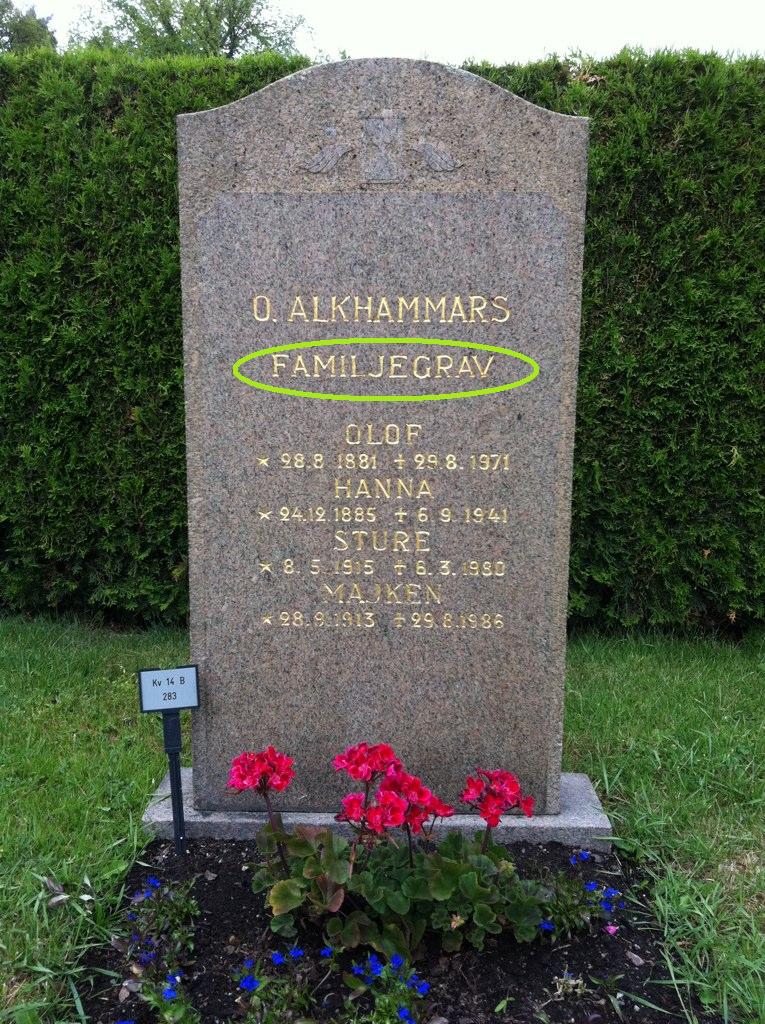
  • Familjegrav indicates that the headstone actually marks a family plot, not one particular head (it sounds a lot like family grave if you say it right). These family plots are very common in the photos that have been collected.
  • A big long word in front of a man’s name probably indicates his profession. (This is why I like to keep Google Translate open when I’m doing transcriptions in languages I don’t know. It increases my chances of not skipping a photo.)

This familjegrav lists individuals;
some don’t.
If you have any other tips about Swedish graves, post them in the comments below. If you have tips about your local graves’ quirks, please email them to kristy.stewart (at) billiongraves.com and I’ll put together a post about your area. It’ll help everyone learn something new, and it will get the photos transcribed and searchable more quickly (and more accurately). Do graves in your country (or local area) tend to be grouped into family plots, like the Swedish familjegrav? Is there a tradition of using family mausoleums? Unique ways of formatting names? We’d be happy to have whatever tips or tidbits of information you’d like to share with us.

_________________________
All photo examples are taken from Norra begravningsplatsen in Sweden.

05 July 2011

Smartphones in the Summer Swelter

This weekend many of you went out and collected cemetery photos, and speedy transcribers have already made many of those photos searchable. (There are still about 2800 photos—go transcribe!) Some of the photo-collectors may have run into some of the hiccups we hit over one of our state’s hottest weekends this year. Namely, in the heat of the summer sun, an iPhone tends to get warmer than it likes, especially if it’s constantly updating its GPS position.

When your iPhone is overheating, the screen will grow progressively dimmer until it is very difficult to see anything on it. If you ignore this warning sign (or don’t know what it means), your phone will eventually alert you to the problem. If you stop using your phone for a few minutes and go into some shade or indoors, it’ll cool off fairly quickly and be ready to go again.

The problem of overheating may extend to Android phones as well, though currently we’ve only experienced it on iPhones, and only during our recent high temperatures. So while you’re out mapping cemeteries in the summer sun, be aware that some phones (especially those with black cases) may be struggling a bit in the heat, and give your phone a break when it needs it.

20 June 2011

Make the Most of Your Cemetery Visit

When you visit a cemetery, you’re usually looking for or visiting someone specific. This someone is most likely near and dear to your heart, or at least marginally tied to your blood. It makes sense that you’d want that specific someone to be recorded so as not to be forgotten. But when you’re visiting a cemetery and you have the BillionGraves app along with you, don’t miss your opportunity to record all the people surrounding your specific someone. The app is quick and easy, so it shouldn’t slow you down much to collect photos of the headstones you pass on your way into or out of the cemetery. There are a few photos uploaded to the site that look awfully lonely—only one or two pins mark the only photos collected from a particular cemetery.

Next time, take some extra time and record the surrounding stones. You don’t need to map out the whole cemetery (heaven knows that some cemeteries are too big for hours of mapping out, no matter how fast the tool), but map out the chunk you have time for. Each one of those headstones belongs to a specific someone that another researcher or descendant has ties to. Help them find their connections.

Below are a few wonderful examples. The first is East Lawn Memorial Hills in Provo, Utah, USA. The clump of pins is only part of a cemetery, but it’s a grouping that took one person just over an hour to do. It would be easy to map out this chunk, leave, and come back to finish when you had more time to spare.


This next example is from Skållerud (Bränna) in Mellerud, Sweden. The individual working on this cemetery added it to our database and mapped out what appears to be the entire thing—250 photos. Two-hundred fifty photos is not an incomprehensible number when we’re talking about using the smartphone app, but it took this person special time and attention to map out this small cemetery in Sweden.


On a slightly smaller scale, here is another new contribution from Vaucluse, Australia. The person working on this cemetery added it to our database and mapped out a few rows of grave markers. It’s 122 photos, and it’s already an awesome start on South Head Cemetery. It’s a substantial number of stones, and it’ll be easy to come back and finish the rest later.


Thank you to everyone who records stones with the BillionGraves app, but a special thank you to those who take the extra time to record not only those people you’re looking for, but the ancestors of others who can use the work you’ve completed.

10 June 2011

Photo-collecting Tips & Tricks

Today some of us went to out to test the Android app and some updates to the iPhone app (both are looking sharp, and it shouldn’t be too much longer before we can release them). On our lunch break we shuttled to the Orem Cemetery, scoped out a section that seemed reasonable, and each picked a row of headstones to start on.
The crew lined up and ready to go.
After someone finished a row, they’d leap-frog everyone else’s rows and start the next one. Since Android devices generally take photos even faster than iPhones, we were all moving along as a fast clip. Because of the position of the sun, we didn’t have to worry much about our shadows getting on the stones, there were no grass clippings obscuring the names and dates, and most of the Memorial Day flowers have been removed, so they weren’t blocking anything either.

We’ve realized that turning the Auto Upload setting off (you can do this in your Settings menu) extends the phone’s battery life. When the phone is constantly updating the GPS to ensure the most accurate coordinates the cell service will provide, it’s already working pretty hard. But with the Auto Upload off and our simple organization, we finished our section long, long before we needed to use the car chargers we brought with us. Fifteen minutes after we started, there were almost 550 new photos for BillionGraves.com, and we’d done more than the section we’d initially targeted.

The western grouping of pins were what we captured today.
Jacob & Casey Moncur, two of the Android
developers, race to get the most photos.

Admittedly, there were a few of us who were racing to see who could get the most photos before we finished, so that added to our speed, but most of us were going at a casual pace through the headstone rows. We were going to take some time to demonstrate tips for taking fully legible photos, but the environment at Orem Cemetery was particularly cooperative today and we didn’t need to get too creative. But I’ll point out a few do’s and don’ts and then mention a few other things we’ve found helpful.

The first image below is a picture I took before I cleared the headstone. It may seem a little obvious that the important things on this stone aren’t being recorded by the picture. After all, half of one person’s name is covered by a flower pot. But when you’re moving along at a quick clip, sometimes you forget to treat each stone individually; you forget to make sure each one is legible. This has been the case with a few photos that have been uploaded to BillionGraves.com. The second photo shows the same headstone, but with the flowers moved off the stone and far enough away that the shadows won’t make it difficult for a transcriber to read.

Speaking of shadows, you should always try to keep your own shadow off the stone. The photos below show another headstone, one with the photo taken incorrectly and one taken correctly. Both of these photos are at least somewhat legible, even with the shadows, because we had some favorable light today. But there are other days (and times of day) that aren’t so friendly, and shadows can come out as a solid black mass marring the headstone. Even when they don’t, it’s a lot easier to read an un-shadowed headstone.


Sometimes you’ll have to take a photo upside-down to keep your shadow off the stone, but you can always rotate it afterwards either in the app or on the website (sometimes we take the photos upside-down if one stone is oriented differently than the rest in a row—it lets us keep our rhythm).

Another way to handle unfavorable shadows is to make sure the entire headstone and your phone are in the shade. This can be a little tricky—for us it typically involves two people standing next to each other to create a large enough shadow and then holding the phone within the shade (it would probably be easier if we just remembered to bring an umbrella). If the phone and the headstone are in the same patch of shade, the photo’s exposure and contrast will be set up for the lighting within the shadow, so it will be uniform and legible.

Organizing group trips is our favorite way to collect headstone photos. If you’d like to organize a group to map out one of your local cemeteries, get your fellow family historians together and pick a date—then let us know if you want us to announce the trip on our Facebook and Twitter accounts to you can meet up with other BillionGraves users in your area. Afterwards, tell us about your experience and let us know a little bit about your area, or about some of the people whose headstones you collected. We’d love to share your story and your cemetery with the rest of the genealogical community.